Learn Coding in 2026: The AI Framework That Actually Works

84% of developers use AI coding tools — yet controlled studies show they work 19% slower on complex tasks while feeling 20% faster. If that doesn't make you pause before opening Copilot, nothing will.
The gap between perceived progress and actual skill-building has never been wider. The best way to learn coding in 2026 is to use AI as a delegation tool for boilerplate, not as a replacement for understanding. Write 60–70% of your practice code manually to build intuition and pattern recognition. Delegate repetitive scaffolding to AI — but read and understand every line it generates before running it. This framework prevents cognitive atrophy while still giving you AI's speed advantage.
Key Takeaways
- AI is a delegation tool, not a learning tool — using it to replace thinking makes you measurably worse over time
- Three skills AI cannot replace: system architecture, debugging intent, and evaluating AI output for correctness
- The 60/70 rule: write 60–70% of your practice code manually; delegate the rest to AI for boilerplate and scaffolding
- AI-generated code has 41% more bugs (Source: code quality research, 2025–2026) — learning to review it is now a core developer skill
- Junior developers who delegate too early plateau; those who build depth first compound faster and get hired
What Is the Best Way to Learn Coding in 2026 Without AI Making You Worse at Programming?
The best way to learn coding in 2026 is to use AI as a delegation tool for boilerplate, not as a replacement for understanding. Write 60–70% of your practice code manually to build intuition and pattern recognition. Delegate repetitive scaffolding to AI — but read and understand every line it generates before running it. This framework prevents cognitive atrophy while still giving you AI's speed advantage. The developers winning in 2026 aren't those who let AI write everything; they're the ones who've built a compounding learning loop where AI accelerates their growth instead of replacing it.
{YOUTUBE_EMBED}
Why Memorizing Syntax and Grinding Tutorials Doesn't Work Anymore (And What Changed in 2026)
The old learning path looked like this: memorize Array.prototype.map(), grind 15 JavaScript tutorials, copy-paste Stack Overflow answers, repeat. In 2023, that path was slow but it worked. In 2026, it's actively broken — and not for the reason most people think.
The syntax memorization trap is opportunity cost. AI handles syntax instantly. Spending 40 hours memorizing method signatures is 40 hours you didn't spend learning system design, debugging, or architecture — the skills companies actually hire for now. That's the real cost of the old framework.
Tutorial hell has gotten worse, too. Learners finish 10 tutorials and still can't build anything real. That's because tutorials teach syntax, not judgment. They tell you what .map() does, not when to use it versus a for loop versus a database query.
The Market Signal: Junior Developer Hiring Collapsed
The market agrees. Junior developer employment (ages 22–25) dropped nearly 20% between late 2022 and July 2025 (Source: industry labor data, 2025). Companies aren't hiring for "knows Python syntax." They're hiring for "can read a codebase, spot a bug, and make an architecture call."
Copy-pasting Stack Overflow used to be a survival skill. Now it's a liability. AI is generating code at scale, and that code has 41% more bugs and 30% more static analysis warnings than manually written code (Source: code quality research, 2025–2026). Blindly copying — whether from Stack Overflow or Claude — is the same mistake with a faster feedback loop.
The old bootcamp model is collapsing under its own weight. In 2023, a coding bootcamp cost upward of $15,000 and 12–16 weeks of your life. By 2026, they're largely obsolete, replaced by free AI tutors like Claude, ChatGPT, and Gemini, plus platforms like bibabo.ai that force learners to read and debug code rather than just generate it (Source: 2026 bootcamp market analysis).
The path forward isn't "learn less." It's "learn the right things deeply."
What Skills Do Junior Developers Need That AI Can't Replace in 2026?
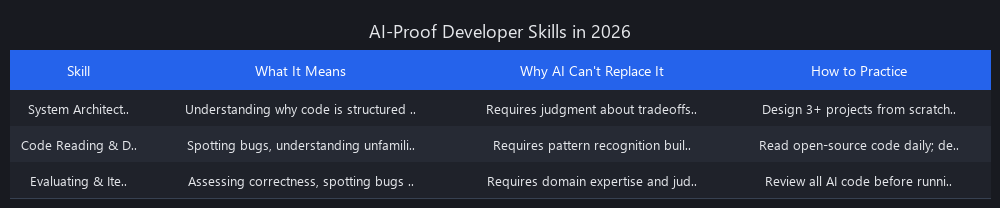
The three skills AI cannot replace are system architecture and design intent, code reading and debugging, and the ability to evaluate AI-generated output. These are judgment skills — and judgment is the one thing that doesn't autocomplete. Here's what each one means in practice and how to actually build it.
Skill 1: System Architecture and Design Intent
This is understanding why code is structured a certain way — not just how to write it.
Claude Code can scaffold a microservice in 30 seconds. What it cannot do is decide whether your app needs microservices, or whether a monolith would ship faster and break less. That's a judgment call that requires understanding tradeoffs, constraints, and business context.
How to build it: study existing codebases, not tutorials. When you read open-source code, ask "why did they choose this pattern?" not "what does this code do?" Write design documents before you write a single function. If you can't explain your architecture in plain English, you don't own it yet.
Practice test: Can you redesign a codebase without touching a single function? Sketch the structure, the data flow, the tradeoffs. If you can't, this is your gap.
Skill 2: Code Reading and Debugging Intent
The ability to read unfamiliar code, trace execution, and figure out what the original author intended — especially when it's broken.
AI can generate a fix for a bug. It cannot reverse-engineer intent from a cryptic error message in a codebase it's never seen. Debugging is hypothesis testing, and good hypotheses require domain knowledge and pattern recognition built from hours of reading real code.
How to build it: spend at least 30% of your practice time reading other people's code — open-source repos, pull requests, legacy systems. Learn to use actual debuggers, not just console.log(). Read error messages like they're telling you something useful, because they are.
Practice test: Can you fix a bug in code you didn't write, in a codebase you've never seen? That's the interview question that matters in 2026.
Skill 3: Evaluating and Iterating on AI Output
This is the new skill that didn't exist five years ago — and it's now non-negotiable.
AI-generated code has 41% more bugs than manually written code. If you can't spot those bugs, you're not a developer — you're a human rubber stamp on a broken pipeline. Learning to review AI output critically, refactor it intelligently, and write tests that expose its mistakes is now a core production skill.
How to build it: never run AI code without reading it line by line. Use static analysis tools. Write tests before accepting AI output. Ask AI to explain its own code — if the explanation doesn't match what the code does, that's a bug.
Practice test: Can you find a bug in AI-generated code that the AI itself missed? If not, you're not ready to ship AI-assisted code to production.
| Skill | AI Can Do This | You Must Own This |
|---|---|---|
| Architecture | Generate a boilerplate microservice | Decide if you need microservices |
| Code Reading | Explain what code does | Understand why it was written that way |
| Debugging | Generate a fix | Verify the fix is correct for your domain |
| Testing | Write unit tests | Design test strategy and coverage |
| Evaluation | Refactor on request | Decide whether to refactor |
How Much of Your Code Should You Let AI Write When Learning Programming?
Write 60–70% of your practice code manually. Delegate 30–40% to AI. This ratio isn't arbitrary — it's calibrated to build intuition without burning you out on boilerplate. Here's exactly what goes in each bucket.
What to Delegate to AI
- Boilerplate: server setup, API endpoint shells, database migrations
- Repetitive patterns: CRUD operations, form validation, standard error handling
- Scaffolding: project structure, config files, folder organization
- Refactoring: after you've written working code manually, ask AI to optimize it
What NOT to Delegate
- Core algorithm logic — sorting, searching, data transformation
- Business logic — the "why" of your specific app
- Architecture decisions — routing, state management, database schema design
- First attempts at any new concept — write it manually first, always
Before you ask AI to generate anything, run this check:
Before asking AI to generate code, ask yourself:
☐ Have I written this pattern manually at least once?
☐ Do I understand the core logic, not just the syntax?
☐ Is this boilerplate/scaffolding, or is it core logic?
☐ Can I review and modify the output if something breaks?

If you answer "no" to any of these → write it manually first.
Here's the difference in practice. Junior A asks Claude Code to build an entire CRUD API from scratch. It works. But Junior A doesn't understand routing, middleware, or error propagation. When something breaks in production, they're helpless. They plateau fast.
Junior B writes the router logic manually, then asks AI to scaffold the endpoints. They understand the architecture because they built the skeleton. When something breaks, they know where to look. They compound.
Same tools. Different outcomes. The difference is what they delegated.
Can You Become a Good Developer if You Rely on AI Coding Assistants? The Compounding Learning Loop Framework
Yes — but only if you treat AI as a delegation tool, not a shortcut. The developers who are winning in 2026 aren't the ones who let AI write everything. They're the ones who've built a compounding learning loop where AI accelerates their growth instead of replacing it. Here's the exact four-step framework that separates developers who compound from those who plateau.
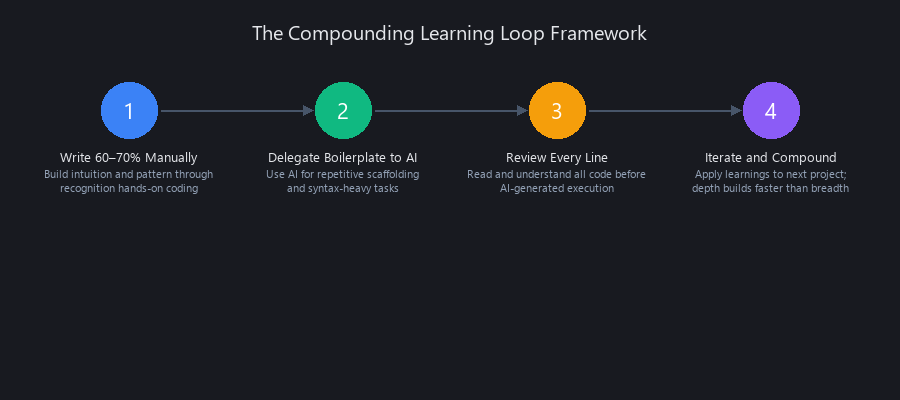
The Compounding Learning Loop: Four Steps
Step 1: Learn the Concept Manually (30% of time)
Read the documentation. Watch one video. Study existing code that uses the concept. Then write a simple, probably ugly version yourself.
This step is non-negotiable. The METR study from July 2025 found that developers using AI on complex tasks were 19% slower than those working manually — and didn't know it (Source: METR, 2025). The manual struggle is where pattern recognition forms. You're not just learning syntax; you're building the mental models that let you debug, optimize, and architect later.
Step 2: Delegate Boilerplate to AI (10% of time)
Once you understand the concept, hand the repetitive scaffolding to AI. Tell it exactly what you need and what you'll handle yourself.
# Example prompt to Claude Code
"Write a REST endpoint for GET /users that returns paginated results.
I'll write the database query and validation logic myself.
Just give me the route handler shell and error handling structure."
GitHub Copilot, Cursor, and Claude Code all handle this well. As of March 2026, Claude Code holds 46% developer preference versus Cursor at 19% and GitHub Copilot at 9% (Source: The Pragmatic Engineer survey, March 3, 2026) — largely because its terminal-native, multi-file execution handles scaffolding tasks more autonomously.
Step 3: Review, Understand, and Iterate (40% of time)
This is the highest-leverage step and the one most learners skip.
Read every line of AI output. Ask: "Why did it do this? Is this the best approach for my architecture? What would I change?" Refactor parts of it. Write tests that would catch the bugs it introduced.
A February 2026 preprint study by Shen and Tamkin analyzed 52 developers learning a new Python library. The group that fully delegated to AI scored 17% lower on post-task conceptual mastery compared to the manual group — and couldn't debug what the AI had written (Source: Shen & Tamkin, 2026). Review isn't optional. It's the whole point.
Step 4: Build the Next Thing, Slightly Harder (20% of time)
Apply what you learned to a new problem with less AI assistance. Increase complexity incrementally.
Project one: AI scaffolds the API, you write the logic. Project two: you scaffold the API, AI only helps with specific functions. Project three: you write 80% from scratch, AI handles one module. This is the compounding curve. It's slow at first and then it isn't.
Why This Framework Compounds Over Time
| Month | You Write | AI Writes | Result |
|---|---|---|---|
| Month 1 | 70% | 30% | Slow, but building intuition |
| Month 3 | 60% | 40% | Faster, more confident |
| Month 6 | 50% | 50% | Architecture skills solid |
| Month 12 | 40% | 60% | You direct; AI executes |
The developers who plateau are the ones who started at month 12 ratios without earning months 1–6 first. The ones who compound are the ones who follow the sequence.
Is It Harder to Learn Coding in 2026 Because of AI Tools?
It's not harder — but it's easier to learn the wrong things. AI makes the shallow parts of coding trivially easy, which creates a false sense of progress. You can ship a working app in a weekend without understanding how any of it works. That feels like learning. It isn't.
The actual hard parts — system design, debugging, reading unfamiliar codebases — are just as hard as they've always been. The difference is that AI can mask your weakness in those areas for longer, which means the gap between "can ship a tutorial project" and "can work on a production codebase" has gotten wider, not smaller.
The Cognitive Atrophy Risk
The cognitive risk has a name: cognitive atrophy. When you outsource decision-making — not just execution — you stop building the mental models that make you a good developer. The Shen and Tamkin study quantifies it. The METR productivity data confirms it. This isn't theoretical.
The good news: the framework above is specifically designed to prevent it. By maintaining the 60/70 rule and following the four-step loop, you're protecting yourself against the exact trap that's catching junior developers in 2026.
Should Beginners Use AI Tools Like ChatGPT When Learning to Code?
Yes, but with guardrails. Beginners should use AI as a tutor and explainer, not as a code generator. Ask it to explain concepts, walk through debugging logic, or critique code you've already written. The rule: write the code first, use AI to understand it better — not the other way around.
This is where our ML Fundamentals Framework becomes relevant — the same principle of building depth first applies across all AI-native learning. Whether you're learning to code or learning machine learning, the compounding curve favors those who understand the foundations before delegating execution.
Frequently Asked Questions
Should beginners use AI tools like ChatGPT when learning to code?
Yes — but only after writing code manually first. Use ChatGPT, Claude, or Gemini to explain concepts, debug your own code, and answer "why does this work?" questions. Don't use them to generate code you haven't attempted yourself yet. The sequence matters: struggle first, then ask AI.
How much of your code should you let AI write when learning programming?
Write 60–70% of your practice code manually; let AI handle 30–40%. Delegate boilerplate and scaffolding — server setup, CRUD shells, config files. Never delegate core logic, architecture decisions, or first attempts at new concepts. If you can't review and modify the AI's output, you delegated too early.
What skills do junior developers need that AI can't replace in 2026?
Three skills: system architecture and design intent, code reading and debugging, and evaluating AI-generated output for correctness. These are all judgment skills — they require understanding context, tradeoffs, and intent. AI can generate code; it cannot decide if that code fits your system or your business logic. We dive deeper into this in our AI Coding Agents guide.
Is it harder to learn coding in 2026 because of AI tools?
Not harder — but easier to fake learning. AI makes shallow coding trivially easy, which creates a false sense of progress. The genuinely hard skills (system design, debugging unfamiliar codebases, architecture decisions) are unchanged. The risk is that AI masks your weakness in those areas long enough that you don't notice the gap until you're in a production incident.
Can you become a good developer if you rely on AI coding assistants?
Yes, if you use them as delegation tools rather than thinking replacements. The METR July 2025 study found developers using AI on complex tasks were 19% slower while believing they were faster — a sign of outsourced judgment, not accelerated skill. Use Claude Code, Cursor, or GitHub Copilot to handle execution; keep architecture, debugging, and code review firmly in your own hands. For a detailed comparison, see our Claude Code vs Cursor analysis.
What's the difference between learning to code with AI versus without AI?
The difference is what you learn, not how fast. Without AI, you learn syntax slowly but build architecture intuition naturally. With AI, you can learn architecture faster — but only if you deliberately protect the manual work that builds intuition. The 60/70 rule ensures you get both speed and depth.
How do I know if I'm using AI tools correctly when learning to code?
You're using AI correctly if: (1) you can explain the code it generates, (2) you've written similar code manually at least once, (3) you can modify and debug its output without asking it again, and (4) you're spending more time reviewing than generating. If you're just running AI output without reading it, you're using it wrong.
The Bottom Line: Learning to Code in 2026 Requires Intentional Framework Design
The developers who thrive in 2026 aren't the ones who use AI the most. They're the ones who use it strategically — as a tool to accelerate execution, not replace thinking. The 60/70 rule, the four-step compounding loop, and the three irreplaceable skills form a framework that protects you against cognitive atrophy while still giving you AI's genuine advantages.
Start with manual code. Delegate boilerplate. Review everything. Build the next thing harder. Repeat.
That's how you learn coding in 2026 without getting worse at programming.
Published by Nuvox AI — practical analysis for developers building in the AI-native era. For more on AI-native skill development, see our ML Skills That Compound Fastest guide.