Learn Coding in 2026: The AI-Native Framework (The Compounding Method That Actually Works)
46% of all code written by GitHub Copilot users is now AI-generated — yet entry-level developer job postings dropped 67% between 2023 and 2024 (Source: Stanford Digital Economy Study). More code, fewer jobs, worse skills. There's a third path out of this.
What Is the Compounding Method for Learning to Code with AI in 2026?
The compounding method combines three practices: learn deeply what AI cannot replace (system architecture, code reading, debugging), delegate strategically to AI what doesn't teach you (boilerplate, syntax, test scaffolding), and verify everything by reading and critiquing AI-generated code. This framework builds judgment that compounds over time, unlike passive code acceptance which actively degrades your skills. The result: developers who use AI as a learning accelerator instead of a skill-eroder, and who remain hireable when code production becomes fully automated.
Key Takeaways
- The compounding method = deep learning on architecture and code reading + strategic AI delegation + active verification — not passive code acceptance
- What to learn deeply: System design, code reading, debugging, architectural patterns — the skills AI cannot replace and that build judgment over time
- What to delegate: Boilerplate, syntax, test scaffolding, documentation formatting — tasks that don't teach you anything new
- The verification trap is real: AI-generated code contains 2.74x more XSS vulnerabilities than human-written code (Source: CodeRabbit, December 2025) — passive acceptance destroys your judgment
- The job market is filtering hard: Companies aren't hiring for code production anymore. They're hiring for code judgment
Why the Old Way (And the "All-AI" Way) Both Fail in 2026
The old learning path — memorize syntax, grind tutorials, copy-paste from Stack Overflow — was already broken before GitHub Copilot existed. Syntax is searchable. Tutorials don't teach judgment. And grinding LeetCode problems doesn't tell you why one architecture beats another under load.
But here's what nobody wants to say out loud: the "just use AI for everything" path is actively making developers worse. Not slowly. Fast.
The Memorization Trap Is Dead — But the Replacement Traps Are Worse
Traditional learning failed because it optimized for the wrong thing: retention of syntax over understanding of systems. You memorized Array.prototype.reduce() instead of learning when to reach for it.
Pure AI delegation fails worse because it skips the understanding entirely. If Copilot writes 46% of your code and you never read it, you're not building a skill in understanding code — you're building a skill in accepting it. That's not a developer skill. That's a rubber stamp.
CodeRabbit's December 2025 analysis of AI-generated pull requests found they contain 1.7x more issues than human-written PRs — specifically because reviewers don't catch what they don't understand (Source: CodeRabbit, 2025). Every line of code you accept without reading is a judgment gap. Judgment gaps compound negatively.
How the Job Market Is Filtering for Understanding in 2026
A Stanford Digital Economy Study tracking ADP payroll data found a 20% decline in employment for software developers aged 22–25 between late 2022 and July 2025 (Source: Stanford Digital Economy Lab, 2025). Meanwhile, developers aged 35–49 in equivalent roles saw 6–9% employment growth.
The market isn't shrinking — it's splitting. Companies are no longer paying entry-level salaries for code production. AI does that now. What they're paying for is code judgment: architecture decisions, security reviews, debugging production systems, refactoring legacy codebases that no AI can fully context-switch into.
Entry-level developers who can only write code are competing with free tools. Developers who can read, critique, and improve AI-generated code are competing with nobody.
The Security Vulnerability You're Shipping Without Knowing
AI-generated code is 2.74x more likely to introduce XSS vulnerabilities, 1.91x more likely to produce insecure object references, and 1.88x more likely to mishandle passwords (Source: CodeRabbit, December 2025).
Why? Because AI models like GitHub Copilot and Cursor are trained on public code — which includes bad public code. They don't understand your threat model, your production environment, or what "good enough" means for your specific context. If you ship AI-generated code you didn't read, that liability is yours.
The 3 Skills You Must Learn Deeply in 2026: What Coding Fundamentals Matter Most in the AI-Native Era
Here's the opinionated take: you don't need to memorize more. You need to understand more deeply. Three skills compound harder than anything else in the AI-native era — and none of them are "learn a new framework."
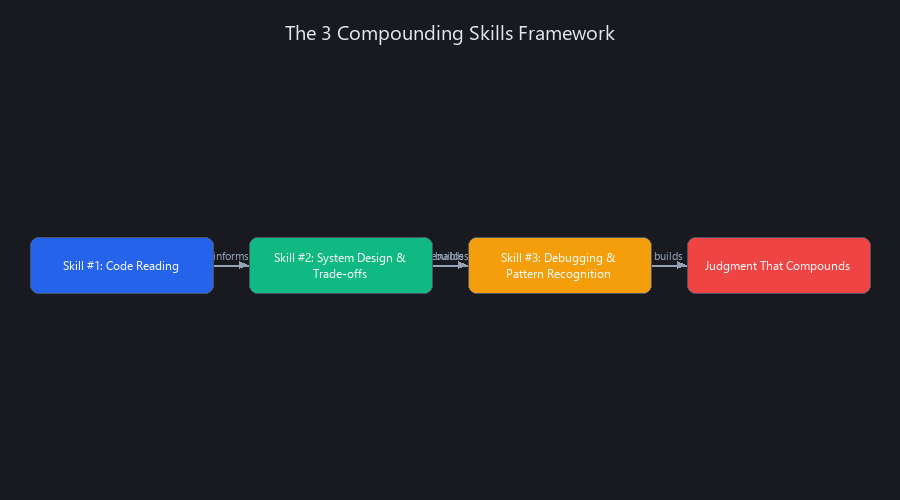
Skill #1: Code Reading (Not Code Writing) — The Highest-Leverage Skill
Delegate code writing. Never delegate code reading.
Every line of code you read teaches you patterns, trade-offs, and consequences. Every line you accept without reading creates a blind spot. After six months of reading 30 minutes of production code per day — your own repo, open-source projects, code reviews — you'll spot architecturally broken AI output in seconds.
The practical method: open a production codebase (your own, or something like the Django or FastAPI source on GitHub). Pick one file. Ask yourself: Why this pattern? What problem does it solve? What would break if I changed this?
AI can generate code. It cannot interpret your codebase's specific constraints, team conventions, or the three-year-old architectural decision that makes refactoring this module a nightmare. Code reading is where you build that context-specific judgment.
Skill #2: System Design and Trade-Off Analysis — The Decision-Making Skill
Use AI to generate options. Never delegate the decision.
System design decisions made early have 100x impact on long-term maintainability. AI can generate a database schema. It cannot weigh "scalability vs. simplicity" for your business context, your team size, or your runway.
The practical method: before writing any code, write a short design doc. Ask your AI tool of choice — Copilot, Claude, Cursor — to generate three different approaches to the problem. Read all three. Critique them. Pick one based on your understanding of the constraints.
After 10 projects, you'll have a mental model of when to abstract early vs. keep it simple, when to reach for a message queue vs. a cron job. That mental model is yours. It doesn't live in a prompt.
Skill #3: Debugging and Judgment Under Uncertainty — The Pattern Recognition Skill
Delegate the fix. Never delegate the diagnosis.
Debugging is where developers actually learn how systems behave — not how they're supposed to behave. According to multiple industry surveys, developers spend roughly 80% of their time reading and debugging code, not writing it. Outsourcing your debugging to AI is outsourcing 80% of your learning.
The method: when you hit a bug, spend 15 minutes debugging manually before asking AI. Understand the root cause. Then use AI to help implement the fix faster.
After 100 bugs debugged this way, you'll have pattern recognition that no AI model currently replicates — because your pattern recognition is trained on your specific production environment, not a generalized training corpus.
What to Learn Deeply vs. What to Delegate to AI: The Decision Matrix
| Category | Learn Deeply | Delegate to AI |
|---|---|---|
| Architecture | API design, DB schema, system boundaries | Generating schema options to compare |
| Code Quality | Error handling, security validation | Boilerplate CRUD, import statements |
| Testing | What to test and why | Test scaffolding, fixture generation |
| Performance | Bottleneck identification, optimization logic | Syntax for optimization implementation |
| Documentation | Architecture decisions, trade-off rationale | Formatting, docstring generation |
| Debugging | Root cause diagnosis | Fix implementation |
How to Learn Coding with AI in 2026 Without Getting Worse: The 3-Step Verification Framework
This is the part most "learn to code with AI" guides skip entirely. They tell you which tools to use. They don't tell you how to use them without hollowing yourself out.
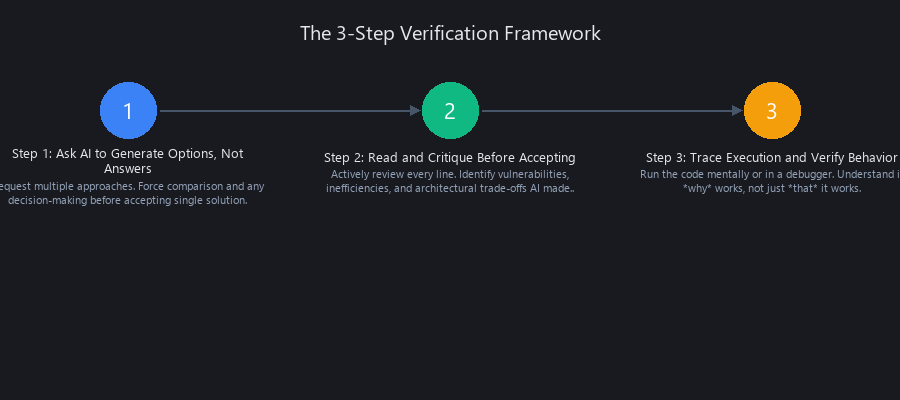
Step 1: Ask AI to Generate Options, Not Answers
Don't ask: "Write me a function that validates an email address."
Ask: "Show me three different ways to implement email validation in Python. Explain the trade-offs between each."
# Option 1: Regex (fast, brittle)
import re
def validate_email_regex(email: str) -> bool:
    pattern = r'^[a-zA-Z0-9._%+-]+@[a-zA-Z0-9.-]+\.[a-zA-Z]{2,}$'
    return bool(re.match(pattern, email))

# Option 2: DNS lookup (slow, accurate)
import dns.resolver
def validate_email_dns(email: str) -> bool:
    domain = email.split('@')[-1]
    try:
        dns.resolver.resolve(domain, 'MX')
        return True
    except dns.resolver.NXDOMAIN:
        return False

# Option 3: Third-party library (balanced)
from email_validator import validate_email, EmailNotValidError
def validate_email_lib(email: str) -> bool:
    try:
        validate_email(email)
        return True
    except EmailNotValidError:
        return False
Now you're not passively accepting code — you're actively comparing approaches, understanding trade-offs, and making a decision. That's five extra minutes per task that compounds into hundreds of hours of judgment-building per year.
Step 2: Read and Critique Before Accepting
After AI generates code, spend two minutes reading it before running it. Ask:
- Do I understand every line of this?
- Could this have security issues?
- Is there a simpler approach that would be easier to maintain?
- What edge cases is this missing?
Red flags to catch immediately: overly complex solutions for simple problems, missing error handling, hardcoded values, no input validation, logic that "works" but can't be explained.
Step 3: Trace Execution and Verify Behavior
Don't just run tests and assume they pass. Trace through complex logic with a debugger or mentally step through it. Add comments explaining the why, not just the what — this forces understanding and helps future teammates (and future you).
After three months of this habit, you'll catch AI mistakes before they become production bugs. That's the compounding effect kicking in.
What Should You Learn vs. Delegate to AI as a Developer? The Practical Framework
The decision is simpler than most guides make it. Run every task through three questions before deciding whether to learn it yourself or hand it to Copilot, Cursor, or Claude.
- Is this task teaching me something new? If yes, do it yourself — even if it's slower. The time cost now pays back in judgment later. If no, delegate it.
- Is this task critical to system correctness? If yes, you must understand it even if AI generates it. Security validation, authentication logic, payment processing — read every line.
- Is this a bottleneck to shipping? If yes, delegate to AI and verify thoroughly. If no, prioritize learning over speed.
Concrete delegation examples using GitHub Copilot or Cursor:
- ✅ Delegate: Boilerplate CRUD endpoints, migration files, test fixtures, README formatting
- ❌ Don't delegate: Auth logic, error handling strategy, database schema decisions, architectural choices
- 🔄 Hybrid approach: Design pattern implementation (AI generates, you understand), complex algorithms (AI suggests, you verify), debugging (AI proposes fix, you verify root cause)
This framework prevents the skill-erosion trap while still letting you ship faster than developers who refuse to use AI at all.
Can You Become a Good Developer by Only Using GitHub Copilot? The Honest Answer
Short answer: No. Not because Copilot is bad — it's genuinely impressive, with a 56.0% SWE-Bench Verified Score and 20 million users as of July 2025 (Source: GitHub, 2025). The problem is that Copilot is a speed tool, not a learning tool, and speed ≠ skill.
The GitClear study analyzing 153 million lines of code between 2020 and 2023 found an 8-fold increase in duplicated code blocks as AI adoption grew (Source: GitClear, 2024). Because Copilot lacks your codebase's full architectural context, it recreates existing logic instead of reusing it — actively violating the DRY principle and accumulating technical debt at scale.
More damning: the Stack Overflow 2025 Developer Survey (49,000 developers, 177 countries) found that 46% of developers actively distrust AI output accuracy, up from 31% the previous year (Source: Stack Overflow, 2025). And 45% report that debugging AI-generated code takes more time than writing it themselves.
Copilot makes you faster at producing code. It makes you slower at understanding it. That's a trade that pays off short-term and bankrupts you long-term.
The developers thriving in 2026 use Copilot for speed on tasks they already understand — not as a substitute for understanding in the first place. We covered this in detail in our AI coding agents 2026 guide, which breaks down how autonomous coding workflows actually change the skill requirements.
How This Compares to Traditional Learning: The Framework That Compounds
Traditional coding education taught you to memorize syntax and grind problems. The AI-native framework teaches you to understand systems and read code. The difference compounds exponentially.
Traditional path: Learn syntax → Build projects → Get job → Learn on the job - Time to competence: 6–12 months - Skill ceiling: Medium (limited by how much you memorized) - Job security: Low (syntax is automatable)
AI-native path: Learn judgment → Delegate syntax → Read AI code → Build systems → Get job - Time to competence: 3–6 months (faster because you're not memorizing) - Skill ceiling: High (judgment is not automatable) - Job security: High (you can evaluate and improve AI output)
The compounding method isn't just faster — it builds skills that remain valuable as AI gets better. We explored this deeper in our ML fundamentals framework, which applies the same compounding principle to machine learning education.
Frequently Asked Questions
Is using AI to learn coding bad for your skills?
It depends entirely on how you use it. Using AI to generate options you then read, compare, and critique builds judgment fast. Using AI to generate code you accept without reading actively degrades your ability to spot bugs, evaluate architecture, and debug production systems. The tool isn't the problem — passive acceptance is. The developers who thrive use AI as a learning accelerator, not a learning replacement.
What should you learn vs. delegate to AI as a developer?
Learn anything that builds transferable judgment: system design, debugging, code reading, security validation, architectural trade-offs. Delegate tasks that don't teach you anything new: boilerplate, test scaffolding, syntax completion, documentation formatting. The rule: if you couldn't explain why the code works without AI's help, you shouldn't have delegated it yet. This distinction is what separates developers who compound skills from those who plateau.
How do you avoid getting worse at coding when using AI tools?
Three habits: (1) Ask AI for multiple approaches instead of one answer, then compare them yourself. (2) Read every line of AI-generated code before accepting it — catch issues before they become bugs. (3) Diagnose bugs manually before asking AI for fixes. These three habits turn AI from a skill-eroder into a skill-accelerator. After three months of consistent practice, you'll notice you catch AI mistakes that other developers miss.
Can you become a good developer by only using GitHub Copilot?
No. Copilot is a speed multiplier for skills you already have, not a substitute for building them. The GitClear analysis of 153 million lines of code found an 8-fold increase in code duplication as AI adoption grew — because Copilot lacks architectural context. Developers who rely on it without deep fundamentals ship faster in the short term and create unmaintainable systems in the long term. The best developers use Copilot for what it's good at (speed on known tasks) and avoid it for what it's bad at (learning new concepts).
What coding fundamentals matter most in the AI-native era?
Three fundamentals compound harder than anything else: code reading (not writing), system design and trade-off analysis, and debugging under uncertainty. These are exactly the skills AI cannot reliably replace — because they require understanding your specific context, codebase, and constraints. Every other fundamental is increasingly delegatable. These three are not. If you master these three, you'll remain valuable regardless of how good AI coding tools become.
The Path Forward: Building Judgment That Compounds
The developers who will thrive in 2026 and beyond aren't the ones who memorize the most syntax or use the fanciest AI tools. They're the ones who build judgment — the ability to read code, understand trade-offs, and debug systems under uncertainty.
Start this week:
- Pick one production codebase (yours or open-source). Read one file. Ask why each pattern exists.
- On your next coding task, ask your AI tool for three approaches instead of one answer.
- Before accepting AI-generated code, spend two minutes reading it. Catch one mistake.
After three months of this, you won't just be faster than developers who refuse to use AI. You'll be better — because you'll understand what AI generates instead of just accepting it.
That's the compounding method. That's how you learn coding in 2026.
Want the full breakdown of which AI coding tools are worth paying for in 2026? We tested Copilot, Cursor, and Claude Code head-to-head — our detailed comparison is live on Nuvox AI. We also published a complete guide to AI coding agents that shows how autonomous workflows are changing what developers actually need to know.